HTTP File Streaming Server
Description
The Http File Streaming Server is an inbound channel, provides HTTP service interface for the HTTP File Streaming Client. The client can upload files to the server or download files from server. The Transmission ID is used for identifying a set of data that has to be transferred.
The Transmission ID is mapped to a local folder of the server. In case of an upload, all files that the client sends are stored under the Transmission ID within the target folder. In case of a download, the server looks in the outbound folder for a transmission folder. If it exists, all files in this folder can be transferred to the client.
When ever a transmission is completed, an event is sent to orchestra that allows the creation of a process instance that can schedule proper actions like removing the files automatically after download.
Note: The transferred files are not deleted automatically. Please take care that the deletion of unused files is done when a transmission is over.
Creation
To create Cloud Connector Server channel, follow the steps described in the general description of Channels
Configuration
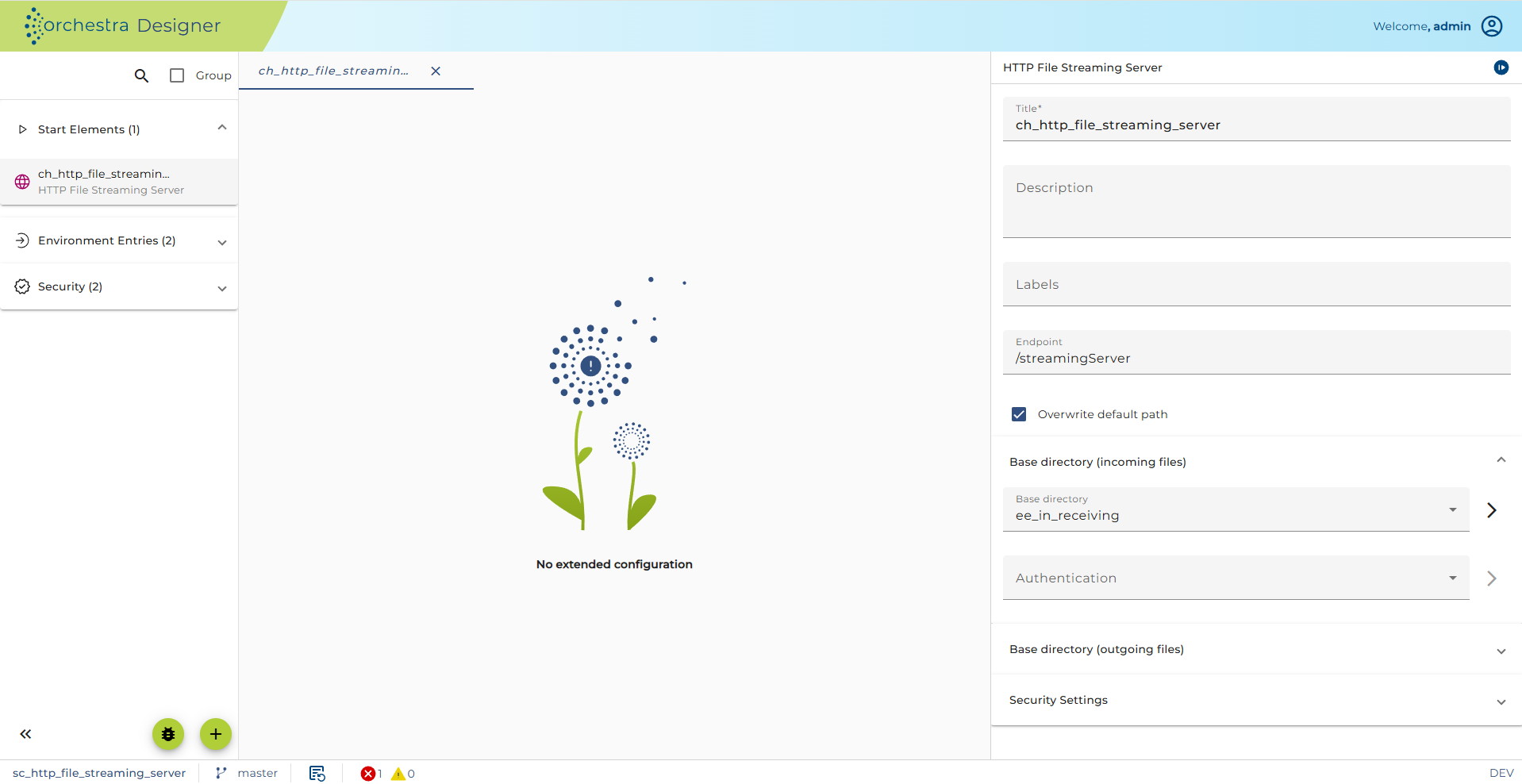 ;
Configuration of the Cloud Connector Server channel
;
Configuration of the Cloud Connector Server channel
An HTTP GET Receiver is used to recognize HTTP GET requests at a specific URL and use them to trigger a process. A start event is generated and a message with a list of the child elements is created. The names of these child elements are the parameter of the HTTP GET method. The incoming message type must be structured like this.
Step by Step
-
Endpoint is a part of URL-Pattern of the web service calls and it is automatically generated in order to provide unique value. Check Overwrite default path option in order to specify a user defined path value.
-
Incoming files storage
-
Base directory Choose an appropriate environment entry which the transferred files from client will be stored.
-
Authentication (Optional) Choose a user for log in. This user must be created before.
-
-
Outgoing files storage
-
Base directory Choose an appropriate environment entry which stores files to be transferred to client.
-
Authentication (Optional) Choose a user for log in. This user must be created before.
-
-
Authentication and Authorization HTTP service interface authentication, For more detailed information about this configuration refer to configuring authentication
Parameters
| Parameter Name | Direction | Description |
|---|---|---|
| TRANSMISSION_ID | Ingoing | A string that identifies the transmission uniquely. |
| FILES_INCOMING | Ingoing | Indicates if the files associated with the transmission ID were uploaded or downloaded by the client. true: client uploads files to server false: client downloads files from server |
| TARGETDIRECTORY | Ingoing | This parameter holds the absolute path to the directory that contains the data of the transmission. |
Throttling
This channel is supported by throttling limit feature that described in chapter Throttling designer.
See also
Cloud Connector